Introduction
For many older adults, a doctor’s appointment is a small expedition: arranging transport, waiting in a queue, climbing stairs, and often needing someone to take time off to come along. A video consultation can change that. With a phone or tablet and a little preparation, your parents can speak to a doctor from their own armchair, in their own home, at their own pace. It may feel unfamiliar at first, but it is far simpler than most people expect. This gentle, step-by-step guide to video consultations for older adults covers everything from getting set up to what to do after the call, so the clinic can come to your living room.
What Is a Video Consultation?
A video consultation is a live appointment with a doctor over a video call. Instead of travelling to a clinic, your parents connect through an app or a link on their phone, tablet, or computer, and speak to the doctor face to face on screen. Afterwards, the doctor can share a digital prescription and advise on next steps.
Many people also call this telemedicine, and for families, telemedicine for elderly parents, grandparents or elderly community members can be a gentle way to keep up with regular health check-ins without the strain of travel. It is simply a different route to the same conversation with the doctor.
What is Telehealth?
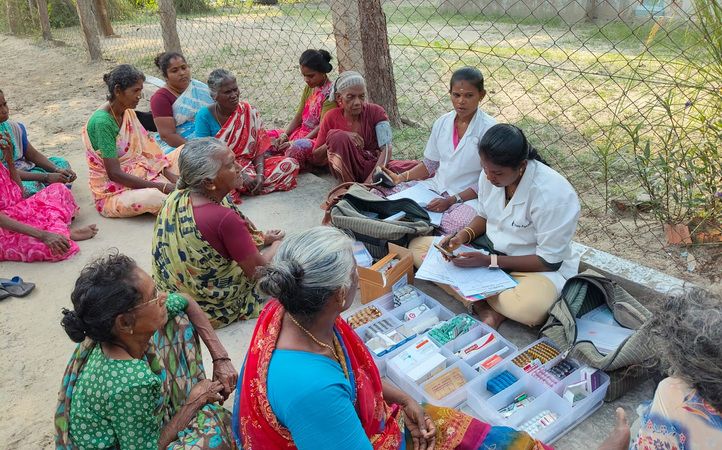
Telehealth is the wider term for getting healthcare services remotely through a phone, tablet or computer. It includes video consultations, and can also cover follow-up advice and sharing reports with the doctor. For older adults who live far from a clinic or find travel tiring, it can bring care much closer to home. This idea is at the heart of HelpAge India’s Telehealth programme. Through a hub-and-spoke model, doctors at city-based hubs connect with elders in remote and underserved areas, who receive free teleconsultations and medicines with support from health staff in their community.
When It Can Help, and When an In-Person Visit Is Better
Video consultations suit many situations, but not all. The doctor is the best judge, and will tell you if your parents need to be seen in person.
| Video Consultation Often Suits | In-Person Visit Is Usually Better For |
|---|---|
| Follow-up visits after a recent check-up | Emergencies, which need immediate care |
| Reviewing test reports and readings | Physical examinations and procedures |
| Questions about medicines or side effects | Sudden or severe symptoms |
| Routine reviews of ongoing conditions | Tests that need to be done in person |
For any sudden chest pain, difficulty breathing, signs of a stroke such as a drooping face or slurred speech, or a serious injury, call the emergency number 112 or go straight to the nearest hospital rather than waiting for an online appointment.
Getting Ready
A little set-up the day before makes the call far less stressful. This is also a lovely time to do a practice run together, so your parents feel confident.
A Phone or Tablet, a Steady Internet Connection, and a Charged Battery
A phone or tablet with a working camera and microphone is enough. Check that the internet connection is steady, since video calls need a reasonably stable signal, and charge the device fully, or keep the charger nearby. A larger screen, such as a tablet, is often easier on older eyes.
A Quiet, Well-Lit Space
Choose a calm spot with good light on your parent’s face, and minimal background noise. Sitting comfortably in a favourite chair, with the device propped up on a table or stand, keeps the screen steady and their hands free.
Setting Up the App or Link and Testing the Sound and Video
Install the app or open the link well before the appointment, and do a quick test of the sound and video. Make sure your parent knows how to switch the camera and microphone on, and how to rejoin if the call drops. Keeping the login steps on a small card nearby can be a great help.
Preparing for the Call
The call is usually short, so a little preparation helps the doctor understand how your parents or grandparents have been feeling. If you keep a health file at home, as suggested in our guide to health routines at home, most of this is already in one place.
Listing Symptoms, Questions, and Current Medicines
Write down, in simple words, what your parents or grandparents have been experiencing, when it started, and what makes it better or worse. Add any questions, and a list of every medicine they currently take, including doses.
Keeping Reports and Recent Readings Handy
Keep recent test reports and any readings, such as blood pressure or blood sugar, within easy reach. Having these ready lets the doctor give more useful guidance.
Having a Family Member Nearby to Help
A family member sitting nearby, even if they stay quietly in the background, can help with the technology, remember details, and take notes. It also gives your parents a feeling of reassurance. If you can’t be there in person, a quick phone call beforehand can help them feel ready.
During the Call
Once the call begins, the goal is simple: have a calm, clear conversation.
Speaking Clearly and Showing the Area of Concern
Encourage your parents to speak slowly and clearly, and to describe things in their own words. If the doctor needs to see something, such as a swelling or a rash, they can show it to the camera in good light.
Asking the Doctor to Repeat Anything That Is Unclear
It is completely fine to ask the doctor to slow down or say something again. Asking “Could you please explain that once more?” is a sign of a good conversation, not a bother.
Taking Notes
Jot down the doctor’s advice as they speak, including any changes to medicines, tests to do, and when to return. If your parents would prefer, a family member can take notes for them.
After the Call
The conversation doesn’t end when the screen goes dark. A few quick steps help turn the advice into action.
Understanding the Prescription and Follow-Up Steps
Read the prescription together and check that the medicines, doses, and timings match what the doctor said. If anything seems unclear, contact the doctor’s clinic to confirm before making any change. Some medicines cannot be prescribed through a video consultation, so the doctor may advise an in-person visit for those.
Keeping Records for the Next Visit
Save the prescription and any notes in the health file, on paper or on the phone, with the date. Having a clear record makes the next consultation, online or in person, much smoother.
Staying Safe: Using Trusted Platforms and Never Sharing OTPs or Passwords
Safety matters as much as convenience, and a few simple rules go a long way:
- Use trusted platforms: The government’s eSanjeevani service offers free video consultations with doctors, and a doctor’s own clinic or hospital will have an official link or app. Download apps only from official app stores.
- Never share OTPs or passwords: A genuine doctor or platform will never ask for a bank OTP, PIN, or password.
- Be careful with unknown links and callers: Do not click on links from unfamiliar messages, or install an app because a stranger on the phone asks you to.
- Check the prescription: A valid prescription from a registered doctor carries their name and registration number.
- Share reports only through the platform or with the doctor directly.
If anything feels unusual, pause the call and ask a family member, or call the clinic on a number you already trust.
How HelpAge India’s Telehealth Programme Supports Older People
Not every older person has a smartphone or a family member nearby to help. A HelpAge India survey released in 2024 found that around 1.5% of elders had used tele-consultation services in the previous year, and only about one in five could use digital devices comfortably. This is part of why HelpAge India’s Telehealth programme exists.
The programme brings free teleconsultations and medicines to older people in underserved and remote areas, supported by local health staff who connect elders with doctors. It also includes regular health awareness sessions and home visits for bedridden elders, so that distance and cost do not keep elders from care. Availability depends on location, so it is best to check the programme page for the latest details.
Final Thoughts
A video consultation is really just a conversation with a doctor, in a more comfortable place. A lovely first step is to do a practice call together before the real appointment, so your parents and grandparents can see how simple it is. After that, keep the routine light: one device, one quiet spot, one list of questions. HelpAge India, recognised with the UN Population Award 2020 for its work in ageing, has spent over 45 years supporting older adults across the country, and its Elder Helpline (1800-180-1253), active in a number of states, is there for guidance whenever families have questions. Families who want to make this care possible for more elders can donate or give to HelpAge India’s work.
FAQs
1. Is a video consultation as good as visiting the doctor in person?
For many situations, such as follow-ups, reviewing reports, and questions about medicines, a video consultation works very well. When a physical examination or test is needed, the doctor will advise an in-person visit, so it is best to follow their guidance.
2. What do we need for an online doctor consultation for seniors?
You need a phone, tablet, or computer with a camera and microphone, a steady internet connection, and a quiet, well-lit space. It also helps to have a list of symptoms, current medicines, and recent reports ready beforehand, along with a family member nearby if possible.
3. Is there a free way to consult a doctor online?
Yes. The government’s eSanjeevani service offers free video consultations with doctors, and you register with a mobile number and an OTP. Timings vary from state to state, so check the portal or app for the schedule in your area.
4. How can I help a parent who isn’t comfortable with technology?
Do a practice run together a day or two before, keep the steps written down on a card, and stay nearby on the day for support. Patience helps most, since confidence tends to grow quickly after the first successful call.
5. Is it safe to share health reports and personal details online?
It is safe when you use trusted platforms and share reports only with the doctor through the platform. Never share OTPs, passwords, or bank details, and be careful with links or calls from unknown people.
6. How does HelpAge India’s telehealth programme help older people?
The programme brings free teleconsultations and medicines to older people in underserved and remote areas, with local health staff helping elders connect with doctors. It also includes health awareness sessions and home visits for bedridden elders, and availability depends on location.
This blog has been written by:
HelpAge India